Inventory and test each supplied key separately
Record every key or authorised access device and test it independently using the relevant instructions, with other keys out of the detection area. Check the functions that are actually fitted rather than assuming identical operation across generations. Record a missing, damaged or non-working key in the inventory. If replacement or removal of lost-key authorisation is needed, use a legitimate service provider and proof of ownership. Do not accept a copied shell as evidence that a second working electronic key has been supplied.
Establish what the infotainment unit really supports
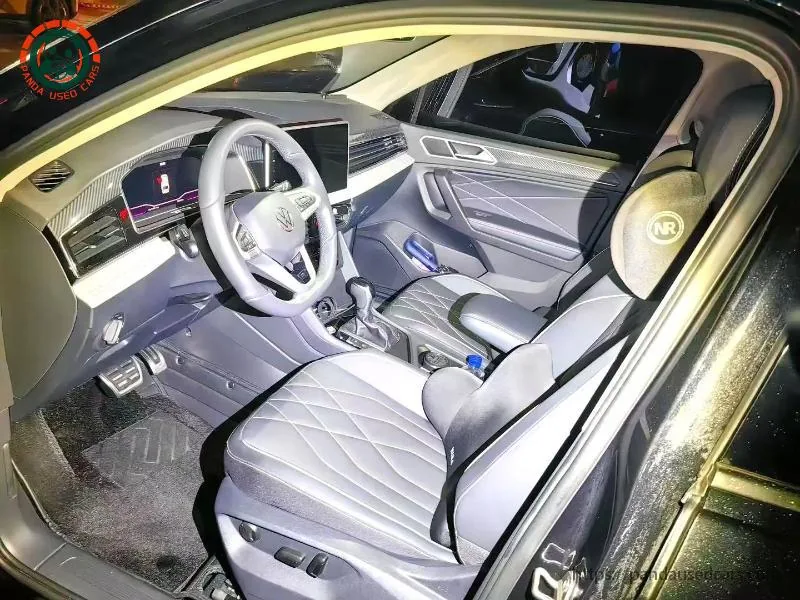
Record the installed unit, software information, language options and demonstrated functions. Test local media, Bluetooth or phone integration only where supported, using a temporary device and deleting its data afterward. A menu item is not proof that the corresponding paid service or regional feature is available. The Tiguan software and assistance guide separates visible equipment from supported operation. Do not approve an unofficial firmware change merely because it promises translation; compatibility, security and service consequences need assessment first.
Separate local functions from online services
Navigation data, remote features, embedded connectivity and subscriptions can have market-specific conditions. Ask the relevant provider about availability and transfer for the candidate and destination, and preserve the response. A seller's phone demonstration in China does not establish operation after export. Decide which functions are essential and which are optional before comparing prices. A buyer who only needs ordinary local audio may accept a different support boundary from someone relying on remote preconditioning or a particular navigation service.
Arrange an authorised account and data handover
The legitimate owner should remove personal devices, destinations and linked access through the supported process. Record completion without copying passwords, private messages or other unnecessary data into the purchase file. A factory reset and an account unlink can be different operations; ask the provider what the actual system requires. Do not attempt to bypass an ownership lock. If transfer cannot be confirmed, leave the affected function unresolved rather than assuming that disconnecting the battery will remove the previous owner's authority.
Plan offline access and workshop support
Ask how the vehicle is accessed and operated if a remote service is unavailable, following the applicable manual. Confirm that the buyer receives the physical items and instructions needed for the fitted system. A destination workshop should verify what legitimate key or infotainment work it can perform on that market specification. Include relevant costs in the ownership budget. A promise that any Volkswagen dealer can resolve every imported-unit issue is not a substitute for an actual support answer.
Make the signed inventory specific
List tested keys, manuals, confirmed local functions, account-transfer status and any services expressly not guaranteed. Distinguish work completed before dispatch from work the buyer has accepted for later. If a key is replaced, repeat the individual tests and update the count. Preserve the handover evidence with the dispatch record so keys and accessories do not disappear between inspection and loading. Do not place account credentials on a visible shipping label or in a public vehicle listing.
Example: two keys on one ring
A seller demonstrates remote unlocking and starting while both keys remain together. That proves the car recognised at least one available key, not that both work. Ask for separate demonstrations and document the result. If the second key fails, obtain a supported repair or replacement scope before agreeing its value. Meanwhile, check account removal independently: resolving the key issue does not settle online access, and a completed account transfer does not repair a defective physical key.
Buyer checklist
- Test each key with the other keys absent.
- List only functions demonstrated on the actual unit.
- Use supported account-transfer and privacy procedures.
- Record destination service limitations before purchase.
Questions and answers
Will changing the screen language unlock overseas services?
Not necessarily. Language, hardware, account region, subscriptions and provider availability are separate questions.
Should the seller give me their account password?
No. Use the legitimate ownership-transfer or unlinking procedure rather than taking over someone else’s credentials.
Reference information
Use the applicable market and year documentation for equipment and operating limits. The references have their own market and publication scope; they do not establish the condition, fitted equipment or destination approval of an individual vehicle.
Continue with the Tiguan software checks, or send your vehicle requirements.